RoboCasa365#
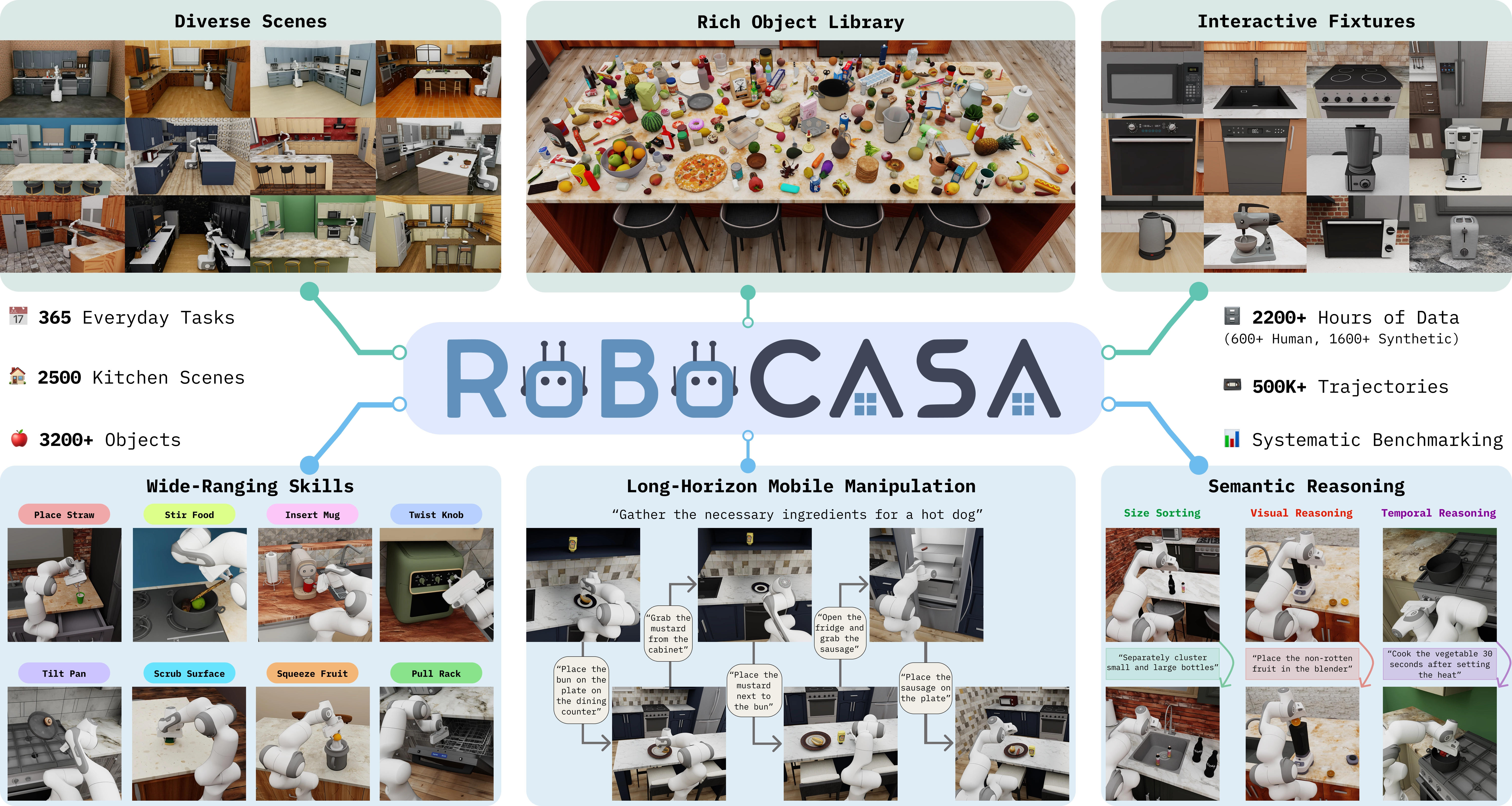
Kitchen scenes, objects, and tasks in RoboCasa365. Source: RoboCasa365 project.#
Run kitchen manipulation tasks with RPent in RoboCasa365, then reproduce Target50 experiments. This integration uses the PandaOmron mobile manipulator and the RLDX-1 action model; its CLI name is robocasa.
Overview#
Check the model, task, and runtime requirements before following the installation and run steps.
RLDX-1
api, claude_code, codex
Target50 kitchen tasks
Linux, NVIDIA GPU; Python 3.10; CUDA and EGL.
Tasks#
Target50 covers the following categories. The reproduction section lists the complete task/seed matrix and run limits.
Category |
Tasks |
Scope |
|---|---|---|
Atomic |
18 |
Individual kitchen operations. |
Composite-Seen |
16 |
Composite tasks in seen categories. |
Composite-Unseen |
16 |
Composite tasks in unseen categories. |
Observation and Action#
The table distinguishes planner tools, model inputs, and the environment’s success criterion.
Item |
Description |
|---|---|
Observation |
Camera views, depth/world coordinates, and mobile-base, end-effector, and gripper state. RLDX-1 receives three camera histories plus state and task text. |
Action |
The planner calls |
Reward / success |
Evaluate success using the environment’s |
Task prompt |
Use the current environment’s complete |
Installation and Resources#
Use Linux, an NVIDIA GPU, a working CUDA/EGL setup, git, and uv. If you already have the repository, enter it and start at environment creation.
RLDX-1 requires Python 3.10. Create a dedicated environment and install
the complete RoboCasa365 stack with .[robocasa]:
git clone https://github.com/RLinf/RPent.git
cd RPent
uv venv --python 3.10 .venv-robocasa
source .venv-robocasa/bin/activate
First install a matching CUDA-enabled PyTorch and torchvision pair using the
PyTorch installation selector
for your GPU, driver and Python version. Run the selected command in this
environment (use uv pip in place of pip). The RLDX dependency requires
Torch >= 2.7 and torchvision >= 0.22; choose a mutually compatible pair, not
two independent versions. Then install RPent:
uv pip install -e ".[robocasa]" \
   --constraint robots/robocasa/eval/target50-constraints.txt
uv pip check
The constraints file pins compatibility-sensitive Target50 dependencies. The robocasa extra installs the rpent branches of RoboCasa, RLDX, and Robosuite. Do not also install rlinf-robocasa365, which provides the same import package.
Choose Torch, torchvision, and CUDA for your machine. The reference run used Torch 2.7.0, torchvision 0.22.0, and CUDA 12.6. Record resolved dependencies and Git revisions for every reproduction because branches can advance:
uv pip freeze > installed-requirements.txt
git rev-parse HEAD > rpent-revision.txt
flash-attn is optional; RLDX-1 uses PyTorch SDPA when it is absent. If needed, follow the FlashAttention instructions to select a compatible build.
Post-install setup
Download the kitchen assets (~10 GB) outside site-packages so they survive
reinstalls. Target50 does not use RoboCasa dataset or teleop macros, so skip
the optional private-macros setup:
robocasa-download-assets --assets-path ~/.robocasa/assets --no-macros -y
It prints the environment variable to export afterwards; add it to the shell
that launches rpent:
export ROBOCASA_ASSETS_PATH=~/.robocasa/assets
The installer supplies downloaded collections and bundled scene files. Add --skip-existing on subsequent runs to check existing downloads. See troubleshooting below for resource conflicts, disk space, and camera errors.
RLDX-1 checkpoint
The --vla-model-path flag on the run commands below expects a
local path to the RLDX-1-FT-RC365 checkpoint (the RoboCasa365
fine-tune). Download it from HuggingFace:
hf download RLWRLD/RLDX-1-FT-RC365 \
   --revision 587e9ecdcc5e7184fcc17f58713908edff5af041 \
   --local-dir ./checkpoints/rldx-1-ft-rc365
If the download is slow, use the HF mirror:
HF_ENDPOINT=https://hf-mirror.com hf download RLWRLD/RLDX-1-FT-RC365 \
   --revision 587e9ecdcc5e7184fcc17f58713908edff5af041 \
   --local-dir ./checkpoints/rldx-1-ft-rc365
RLDX-1 backbone support files
The FT checkpoint contains the weights but also references
RLWRLD/RLDX-1-VLM for architecture, processor and tokenizer metadata.
Target50 freezes revision 4b9f870d1287e0d38d7eb1445e6d8c60afe66dd7:
15 non-weight files, about 16.4 MB including documentation and images.
Download these into the same cache used when launching RPent:
export HF_HOME="$PWD/.cache/huggingface"
export HF_HUB_CACHE="$HF_HOME/hub"
hf download RLWRLD/RLDX-1-VLM \
   --revision 4b9f870d1287e0d38d7eb1445e6d8c60afe66dd7 \
   --include "*.json" "*.txt" "*.jinja" "*.md" "*.png" ".gitattributes" \
   --exclude "*.safetensors.index.json"
No additional base weights are required. Keep these cache variables in the
launch shell; do not shadow them with an empty TRANSFORMERS_CACHE.
The RoboCasa VLA worker automatically uses this same support revision for
both ordinary and Target50 runs, including separately started RPent VLA
servers. There is no extra revision flag or manual cache-ref edit. The pin
applies only to backbone metadata, not the weights selected by
--vla-model-path. Model and asset licenses apply separately from RPent’s
code license.
Run a Task#
Configure your model service with Planner Configuration and check it using rpent-check-llm. Run OpenDrawer with seed 1:
rpent --robot robocasa \
      --task-name OpenDrawer \
      --split target \
      --seed 1 \
      --vla-model-path ./checkpoints/rldx-1-ft-rc365 \
      --planner claude_code \
      --model claude-opus-4-8
RoboCasa does not select a planner implementation; the api, claude_code, and codex planners can run this robot. See Planner Configuration for configuration.
View Results#
Task success comes from the environment’s _check_success() result, exposed as state.success. The planner’s finish status ends its conversation and is not an evaluation label. Inspect result.json, transcript_*.json, and run.log in the output directory; service startup errors are in env_server.log and vla_server.log.
Use --dashboard to watch cameras and planner output; see Interactive Usage for the shared workflow.
Task Memory#
With --memory-profile hf (the default), the CLI and Dashboard synchronize
robocasa/** from the current main branch of the
RLinf/RPent-memory dataset.
Memory is not pinned to a commit. The layout is:
memory/robocasa/
├── task-specific/
│   ├── <Task>_s0.json
│   ├── <Task>_s0_recipe.jsonl
│   └── <Task>.md              # optional
└── global/
    └── GLOBAL_MEMORY.md
In HF evaluation, RoboCasa provides the current task’s available JSON, recipe and Markdown
alongside global/GLOBAL_MEMORY.md. The planner uses read_text_file to
consult relevant task-specific and global guidance as needed. It chooses when
and how much to read; actions and completion do not require every file to be
read first. There is no option to disable the global layer.
The prompt and file tools share the same selection. RPent file tools deny other tasks’ memory; this is a tool restriction, not an operating-system sandbox. A missing JSON/JSONL pair is allowed: the planner continues with live observations and global guidance. A half-present pair is an error. Missing optional Markdown is logged, and the global file must exist. Files are discovered by task name and directory; no extra index is needed. The CLI validates memory before starting robot services. Dashboard validates the memory root and global layer before starting its shared VLA, then checks each selected task’s files before starting that task’s environment. A task memory error leaves the existing shared VLA available for other tasks.
Live task_language, RGB-D observations, task progress and tool results take
precedence over memory. Apply a global strategy only when its visible
preconditions hold. Continue VLA calls while contact, a held object, fixture
progress or a counter increase shows progress. After two consecutive calls
without contact or visible progress, re-ground and make a bounded pose
adjustment. Every VLA call uses the full, verbatim live task language.
Historical vla_act entries describe strategies; use current tools and
never replay historical coordinates. Reset remains unavailable during evaluation.
To use local memory, download into a fresh directory and select the local profile. This also avoids retaining deleted files in an older download directory:
hf download RLinf/RPent-memory --repo-type dataset \
   --include 'robocasa/**' --local-dir ./target50-memory

rpent --robot robocasa \
      --task-name OpenDrawer --split target --seed 1 \
      --vla-model-path /path/to/rldx \
      --planner codex --model gpt-5.5 --reasoning-effort xhigh \
      --memory-profile local --memory-dir ./target50-memory/robocasa
Future memory updates are published to HF main. The
reproduce/memory archive
retains the GPT-5.5 Harness-VLA reproduction resources at d8c25a7f, with
its existing contents and directory names unchanged. Its RoboCasa files use
task_only/; the current loader requires task-specific/ and does not
convert the old layout. Downloading that archive and passing it to the current
--memory-profile local loader is not a supported reproduction command.
The archive’s README describes its historical behavior, not the current CLI.
No matching RoboCasa code/data snapshot is established by this guide; the
commands above use the current main corpus.
Local exploration output is also supported directly, without conversion. For
--task-name <Task> --split <split>, local evaluation selects either the
published <Task>_s0.json / <Task>_s0_recipe.jsonl pair or the native
<Task>_<split>_s0.json / <Task>_<split>_s0_recipe.jsonl pair in
task-specific/. Either half-pair is an error. If both pairs exist, use
separate --memory-dir directories; RPent does not choose between them.
When neither pair exists, evaluation can use global guidance alone.
Local evaluation also exposes global/*.md and the task-family/*.md
leaves whose YAML frontmatter matches suite: robocasa, regime: <split>
and task_id: <Task>. Other tasks and splits are excluded. An optional
task-specific/<Task>.md remains available. Evaluation neither requires nor
exposes the corpus-wide MEMORY.md index or _internal/; it lists the
selected files directly. Missing global memory prevents evaluation startup,
including with the local profile. The same selection drives prompts, file
permissions, and read audits; results record the actual profile and matching
family identity for validation.
Custom Memory Sources#
To use another HF dataset with the same robocasa/ layout, set
RPENT_MEMORY_HF_REPO=<owner>/<dataset> when launching RPent with
--memory-profile hf. This accepts a dataset repository ID, not a browser URL.
For a custom subdirectory or a maintained branch, download that subtree into a fresh directory and use the local profile:
hf download <owner>/<dataset> --repo-type dataset \
   --include '<subpath>/**' --local-dir ./custom-memory

# Add to the RPent run command:
# --memory-profile local --memory-dir ./custom-memory/<subpath>
The selected directory uses task-specific/ and must provide at least one
readable global/*.md file. Add --revision <branch> to the HF download
command when selecting a branch. No delivery package or migration script is
required.
Exploration Mode#
Add --explore to let the planner retry a task across fresh episodes and
write local memory. The directory may start empty; exploration can read its
index and write to its own inbox. As with LIBERO, one run allows up to three planner sessions
with at most five attempts per session by default:
rpent --robot robocasa --task-name OpenDrawer --split target --seed 0 \
  --vla-model-path /path/to/rldx \
  --planner codex --reasoning-effort high --planner-timeout-s 7200 \
  --explore --explore-sessions 3 --explore-attempts-per-session 5 \
  --memory-dir /path/to/robocasa-memory
reset uses the environment’s ordinary episode reset. The runner exports
only the winning commands after the final reset. Exploration memory is written
to the current local inbox. Drafts are merged when the run completes normally
without an agent execution error. Pass --no-auto-merge-memory to disable
automatic merging. The exploration prompt is in
robots/robocasa/prompts/explore.py and covers mobile-base use,
task_progress, RLDX continuity, and failed-attempt notes.
Shared memory merge publishes accepted proposals under task-family/ and
global/, copies the successful audit/recipe pair into task-specific/,
and refreshes MEMORY.md. To evaluate these native files, use seed-0
exploration output and --memory-profile local with the same directory.
Evaluation requires global memory to have been published first and uses its
own task/split access boundary; exploration keeps its retry and inbox workflow.
Experiment Reproduction (Target50)#
The current robots/robocasa/eval/target50_v2.json protocol
(robocasa-harness-vla-v2) uses task/global memory without pinning its
data version. It preserves the target task/seed matrix, cell time limits,
no-reset rule, environment success predicate, and 40/999/8 RLDX settings.
The protocol ID identifies the result format and evaluation rules; it lets the
validator distinguish v1 from v2 and does not select a memory data version.
Results record the fixed task/global selection, missing files and actual reads. The validator accepts zero or partial reads, while checking task boundaries and the audit structure. Missing or corrupt audit files are reported separately; read completeness does not determine the environment result’s validity or success. Each run starts a fresh audit, even when reusing an output directory.
Memory contents are not compared across runs. HF main receives future
updates, while reproduce/memory remains an unchanged historical archive.
For a repeatable comparison using the current layout, download memory once
and use the same unchanged directory with
--memory-profile local --memory-dir for every cell. Retain the files and
record the HF commit or hashes in local experiment notes. RPent does not pin
memory or add data revision identifiers to result metadata.
The manifests describe the evaluation matrix and validation rules; the leaderboard displays independently reported scores. A 340-cell result alone does not establish which memory, model or code configuration produced it. The current v2 manifest includes a GPT-5.5 reference profile; it is not a universal validator for every model on the leaderboard.
target50.jsonretains the historical v1 task-specific protocol. Validate compatible historical records with--manifest robots/robocasa/eval/target50.json.target50_v2.jsondescribes current runs with task-specific and global memory. It is the default for new results and validation.Published leaderboard scores retain their original reported sources; they are not reclassified as v2 results without matching run evidence.
Each cell is one task/seed combination. Source dependencies follow the recorded
rpent branches; retain their resolved commits with the experiment artifacts.
Split |
Tasks |
Seed range per task |
Cell timeout |
Cells |
|---|---|---|---|---|
Atomic |
18 |
1–10 |
1800 s |
180 |
Composite-Seen |
16 |
1–5 |
3600 s |
80 |
Composite-Unseen |
16 |
1–5 |
3600 s |
80 |
Total |
50 |
340 |
Seen/unseen describes whether tasks occur in the pretraining data; target kitchens form a separate held-out scene split. See the RoboCasa dataset definitions. The tasks split into three groups:
Atomic (18) — single-primitive articulation and pick-place tasks:
CloseBlenderLid,CloseFridge,CloseToasterOvenDoor,CoffeeSetupMug,NavigateKitchen,OpenCabinet,OpenDrawer,OpenStandMixerHead,PickPlaceCounterToCabinet,PickPlaceCounterToStove,PickPlaceDrawerToCounter,PickPlaceSinkToCounter,PickPlaceToasterToCounter,SlideDishwasherRack,TurnOffStove,TurnOnElectricKettle,TurnOnMicrowave,TurnOnSinkFaucet.Composite seen (16) — multi-step tasks represented in the pretraining data:
ScrubCuttingBoard,StackBowlsCabinet,WashLettuce,RinseSinkBasin,PreSoakPan,StirVegetables,LoadDishwasher,SteamInMicrowave,SetUpCuttingStation,GetToastedBread,DeliverStraw,KettleBoiling,PrepareCoffee,StoreLeftoversInBowl,SearingMeat,PackIdenticalLunches.Composite unseen (16) — multi-step tasks absent from the pretraining data:
ArrangeBreadBasket,ArrangeTea,BreadSelection,CategorizeCondiments,CuttingToolSelection,GarnishPancake,GatherTableware,HeatKebabSandwich,MakeIceLemonade,PanTransfer,PortionHotDogs,RecycleBottlesByType,SeparateFreezerRack,WaffleReheat,WashFruitColander,WeighIngredients.
Pass any of these to --task-name. The full RoboCasa catalog is
larger; see the RoboCasa upstream.
For a repeatable Target50 comparison, prepare the current corpus once using the Task Memory download command above. Keep that local directory unchanged for all cells and retain its source revision or hashes with the results.
For Target50, first prepare the resources and local memory above, then invoke one ordinary
command for each manifest cell. The Codex reference profile is gpt-5.5,
xhigh, and max_turns=100; RoboCasa itself remains planner-agnostic. For
the scene identity, use the ordinary --seed argument and do not set
RLDX_RESET_SEED. Ordinary RoboCasa uses max_chunks=70; Target50 alone
overrides it to 40. Freeze the Target50 RLDX execution values first:
export RLDX_MAX_CHUNKS=40
export RLDX_SETTLE_PATIENCE=999
export RLDX_ACTION_STEPS_PER_CHUNK=8
unset RLDX_RESET_SEED
The first OpenDrawer Atomic cell is:
rpent --robot robocasa \
      --task-name OpenDrawer --split target --seed 1 \
      --vla-model-path ./checkpoints/rldx-1-ft-rc365 --cuda-device 0 \
      --planner codex --model gpt-5.5 --reasoning-effort xhigh \
      --max-turns 100 --planner-timeout-s 1800 \
      --memory-profile local \
      --memory-dir ./target50-memory/robocasa \
      --output-dir ./runs/target50/atomic/OpenDrawer_s1
Use --planner-timeout-s 3600 for either composite split. Execute Atomic,
Composite-Seen, and Composite-Unseen in that order. A cell succeeds only when
the final recorded environment state has state.success=true; the planner’s
finish(status=...) argument is not an evaluation label. Valid task failures
and planner timeouts are not retried. Retry an infrastructure failure only when
no valid environment result was produced for that cell.
Every completed command atomically writes <output-dir>/result.json using
the final environment state.success. The record includes the effective
protocol values but omits provider errors and credentials. Once all cells are
present under <results-root>/<manifest-split>/<Task>_s<seed>/result.json,
validate the fixed denominator and print the task-weighted score with:
python -m robots.robocasa.eval.validate_target50 ./runs/target50
Reported and Historical Target50 Results#
The leaderboard is the source for the reported rates below. The RPent configurations are Codex / GPT-5.5 / xhigh / reasoning, Codex / GPT-6 Astra / low / reasoning, and Claude Code / Opus-4.7 / max.reasoning. The Harness VLA reference column reports GPT-5.5 results from paper Table 4. Overall weights all 50 tasks equally; it is not the fraction of successful cells among 340.
Split |
RPent / GPT-5.5 |
RPent / GPT-6 Astra |
RPent / Opus-4.7 |
Harness VLA / GPT-5.5 reference |
|---|---|---|---|---|
Atomic-Seen |
92.0% |
87.78% |
79.4% |
92.0% |
Composite-Seen |
61.0% |
43.75% |
47.5% |
61.0% |
Composite-Unseen |
13.8% |
42.50% |
15.0% |
13.8% |
Overall (task-weighted) |
57.1% |
59.20% |
48.6% |
57.1% |
The Astra entry reports 59.20% Overall, with 87.78% / 43.75% / 42.50% for the three splits. Its episode count is 340 (180/80/80) following the contributor-confirmed correction. The earlier 250-cell information was an unsynchronized historical record. The correction preserves reported rates; it does not infer success counts from rounded rates or claim a new audit of all 340 original results.
Historical Codex Reproduction#
The archived reproduction contains all 340 cells and reports the following task-level aggregates. These historical values do not describe a new v2 run:
Split |
Successful cells |
Success rate |
Harness VLA reference |
|---|---|---|---|
Atomic |
163/180 |
90.56% |
165/180 (91.67%) |
Composite-Seen |
49/80 |
61.25% |
45/80 (56.25%) |
Composite-Unseen |
12/80 |
15.00% |
11/80 (13.75%) |
Overall (task-weighted) |
N/A |
57.00% |
55.40% |
The archived per-task table contains the success count and accuracy for every task. This historical record is task-level aggregate data; it does not include per-seed traces, raw trajectories, or failure classifications and therefore is not a per-cell audit artifact.
Environment Checks#
After installing RoboCasa and its assets, run the opt-in environment smoke suite to check simulator installation and interfaces. It requires no planner credentials or VLA checkpoint:
uv pip install pytest pytest-timeout
RPENT_RUN_ROBOCASA_INTEGRATION=1 \
   pytest tests/integration_tests/robots/robocasa/test_target50_runtime_smoke.py -v
The four cases cover OpenDrawer, NavigateKitchen, and
PickPlaceCounterToCabinet at seed 1, plus mobile-camera movement. Task checks
verify construction/reset, 12D actions, operation cameras, navigation RGB-D/world
map, the success predicate, and clean close. The camera check verifies pose and
image changes after eight base steps. These real-simulator tests require a working
GPU/EGL setup and are separate from offline CPU CI; skipped tests are not passes.
Troubleshooting#
The asset root must contain downloaded collections and bundled scene, arena, and fixture files. Preserve attribution files. --skip-existing checks download inventories; for conflicting files, confirm that replacement is intended before using:
robocasa-download-assets --assets-path ~/.robocasa/assets --no-macros --overwrite -y
--overwrite takes precedence over --skip-existing and replaces only files in the installation scope. By default, conflicting files are preserved and the destination must support hard links. Allow space for ZIP archives and unpacked data, plus existing data during replacement. Rerun the download after an interruption.
Run the environment smoke tests first. After
downloading all four resources, use the existing RoboCasa E2E component test
to verify VLA worker startup, HTTP RPC and first inference. Install .[test]
if needed, select one available GPU and use a fresh output directory:
CUDA_VISIBLE_DEVICES=0 \
RLDX_MODEL_PATH="$PWD/checkpoints/rldx-1-ft-rc365" \
RPENT_E2E_OUTPUT_DIR="$PWD/e2e-robocasa" \
HF_HUB_OFFLINE=1 TRANSFORMERS_OFFLINE=1 NO_ALBUMENTATIONS_UPDATE=1 \
MUJOCO_GL=egl python -m pytest -q \
   tests/e2e_tests/robocasa/test_components.py::test_rldx_component --timeout=300
These checks do not run a planner or create benchmark results. Skipped tests are not passes. Offline variables apply only to the check; ordinary HF memory sync needs network access. Keep remote planner proxies unchanged. The lightweight protocol tests still validate all 50 tasks and the fixed 340-cell denominator; full benchmark execution is a separate procedure.
For slow package downloads, use
UV_HTTP_TIMEOUT=600and put caches and temporary files on a sufficiently large filesystem. Retry the pinned HF download; apparent shard size is not a completeness check. Do not disable TLS.A read-only asset failure needs the corrected RoboCasa dependency, not writable canonical assets. Transformed XML uses the temporary directory.
For an RLDX offline cache miss, check the support snapshot and cache variables above.
NO_ALBUMENTATIONS_UPDATE=1disables only an import-time version check, not image processing. Keep the existing image-geometry fallback.Test the selected Torch/CUDA build with a GPU operation and EGL render, not just the driver’s version display. Use a build compatible with the host.
For shared read-only installations, set
NUMBA_CACHE_DIRto a writable per-user directory instead of making package code writable.If navigation RGB-D or world-map rendering reports a missing
mobilebase0_navview, reinstall.[robocasa]to refresh theRLinf/robosuiterpentbranch. Do not patch installed XML files manually.If
read_text_filereports a missing current-task result, check thememory/robocasa/task-specific/corpus or the selected local directory. RPent does not fall back to another task’s memory. Markdown is optional; Atomic tasks have no published<Task>.md.Environment and VLA startup failures are recorded in
<output_dir>/env_server.logand<output_dir>/vla_server.log; also inspect<output_dir>/run.logfor the run-level error.Only the exact
127.0.0.1andlocalhosthostnames bypass HTTP proxies automatically. Other hostnames and IPs use the standard proxy environment; add the exact host toNO_PROXYandno_proxyonly when it should be reached directly.
Implementation Notes#
The RoboCasa toolkit exposes the same shape of tools as LIBERO (a
primitive call, a state view, a finish), with two RoboCasa-specific
aspects:
Env-side helpers. Grasp checks and action assembly need the live simulator env, so they live in
env_serveras RPCs. The agent-side skill holds both clients: the env client for render/step, the model client for RLDX-1 inference. See Add a Robot or Simulator for the rationale.Observation shape. RLDX-1 sees 3 camera video tensors
(1, T, H, W, 3)stacked over historyT, plusstate.*andannotation.*fields. The session id is not part of the observation — it is managed automatically by the RPC framework:RpcClientgenerates a privaterpc_+ uuid hex session id,wait_for_readyregisters it with the server on connect; the server tracks each session’s idle time and a background sweep thread reaps sessions idle longer than the timeout (default 3600s), and the client sendssession.closevia atexit on process exit. Business code (rldx_skill/vla_client) never sees the session id directly; the server injects it intopredict/reset_sessionto isolate per-client RLDX memory/RTC policy state.